The move to Vue.js
Motivations
Let's start from the very beginning. I think I should explain the reason why I wanted to learn a new language.
An old project not going anywhere
At the center of it all is an old project that has never seen the light, and probably never will. I guess it's a rather common thing for people to have pet projects, always in development, never finished, and that with the year passing, will never find the success they wished for when starting. For me, it is linked to a non-profit association about bike touring. The initial idea was to build a community platform where cyclist can share bike touring experiences, in a blog post form along with technical statistics like elevation, duration, GPS traces. We started the project with friends and family more than 10 years ago, when this kind of platform did not exist yet but obviously, as time got by, we didn't put enough effort into it.
I remember the first bad decision of going to WordPress. It was not suited, at least at the time, to build this kind of collaborative website on it's free version. We ended up stopping development. I also remember the lockdown period when I got some free time... I'd grown a little and was more proficient with development skills. I produced a complete version in pure HTML/CSS and PHP using Bootstrap. I was functionnal, not feature complete at all and probably insecure even if I put many efforts in setting up complete user management flow with email and encrypted token and passwords.
A few years have passed since this version already. I got back into it, not randomly, but after I discovered FastAPI in a project at work. I remember testing Flask a few years back but this relatively new framework, very popular as I'm writing now, made me want to go back to my pet project and abandon the PHP. My python is not perfect but much better than my PHP. With FastAPI, I could build a safer backend, and maybe finish what I started 10 years ago.

Now you see the catch. If I'm to develop a good backend, I should probably build a good frontend too. I'll explain later why I went to Vue.js and Nuxt.js. But tldr. is that I wanted a recent JavaScript framework growing in popularity to go along FastAPI.
This website
The pet project was a good reason on its own (obviously, as a pet project), but it was not the only one. I discovered later that in the Nuxt framework, you have the possibility to build static sites. This website was made almost 2 years ago using Hugo and a theme called Blowfish. At the time, I wanted to move away from my old Bootstrap version and use a modern way to build my personal pages. Hugo and Gitlab Pages made this possible, but I never intended to learn any Go or dive into Hugo. I'm curious about the frontend/web frameworks but not at the point of learning them just for their own sake. The newly acquired Vue.js and Nuxt.js skills made me improve this website, gain more control over its design and content options, and it's for the best. I'm even (almost) at feature parity with what I was using from Blowfish, wonderful in my book.
Professional inquiries
Last but not least, I thought that if I learn a new language or framework on my own, I should probably aim at something that I could use professionally. Not too hard to understand... I'm a data scientist/engineer. For almost 10 years, I've built data and machine learning pipelines for industrial clients, often working with frontend developer colleagues that delivered my transforms in dashboards. Context and environments vary between clients but something never changes, JavaScript is at the center of the whole frontend stack. Another presonal project I had was to build a data dashboard template project. Something that I could re-use as a fast developement prototype base. Initially built with Dash/Plotly in python, I wanted to move to a more production ready enviroment. Not that Dash is not great, it just lacks design options and the resulting visual appeal that often makes the difference with a client.
First steps
Now you have the context and my thought process for going to JavaScript. I head before about React and Angular and I started searching for the one framework I wanted to learn.

Why Vue.js and Nuxt.js ?
I needed to make the right choice, learn the right framework because, I don't want, or have time to learn multiple. I started by documenting a little what was popular in late 2025-early 2026. Depending on sources, you find always the same top trending frameworks, some established for years and some rather new and promising. I decided I want something rather new. It was the same reasoning I had when learning some FastAPI. Of course Django and Flask were more popular, well documented and established as references. But all top seeds are meant to fall when a better underdog gains trust in communities. I read about Vue.js, created in 2014 and gaining user base ever since. It's also open source, a mandatory criteria for me. I also liked the single file component (SFC) design. It seemed perfectly suited for a beginner as each component would have its logic and rendering in one place. It has obviously many features that I won't discuss in details here, partly because I'm still discovering them and thus not able to give a trusted opinion.

Another decision I took was to use a UI framework. It came to me that a major benefit of the component driven structure is that you can use pre-made ones, already tailored and styled. My basic idea was that I don't want to focus on CSS and website design, I'm not a designer at all. If I can use a library of basic components that just need a few configuration tweaks, it'll be perfect. Then again you have many options but one of them was NuxtUI. It goes along with Nuxt which is a full-stack web framework based on Vue.js, Nitro and Vite.
Nuxt is inspired by Next.js, which is a similar framework based on React. According to their Wikipedia page:
The main advantage of Nuxt over using Vue alone is its universal rendering system. The framework works as both an in-browser single-page application (SPA), and as a server-rendered static website, by hydrating a server-rendered page to a full SPA after it is loaded. This allows websites to have the search engine optimization and performance benefits of a server-rendered site in addition to the interactivity of a client-rendered application. Nuxt largely abstracts the server-rendering features from the developer, and it's therefore able to have a similar development experience to a traditional SPA using Vue's single-file component (SFC) system.
In addition to its universal rendering mechanism, Nuxt also provides many other benefits and quality-of-life features, such as path-based routing, hot module replacement (HMR), TypeScript support out of the box, and middleware and server logic.
For a beginner like me, it offers many quality of life advantages along the potential to use it's related UI module
to speed up the development. It uses the project structure and path for routing, has layout and middleware options
and a built-in server called Nitro. It makes it a full-stack option for many websites. They also have a generate
command to build static sites that can be hosted simply in a shared hosting provider like the one I have.
Of course, the static build feature is not helping build my blogging platform but the FastAPI, SQLModel,
Postgres backend that I built can have a server to server exchange with Nitro, Nuxt's internal server.
Nuxt also leverages TypeScript for type safty which reminded me for pydantic on the python side.
I went for Nuxt and NuxtUI. Of course, everybody won't agree on the choice, but I figured it was an excellent entry point into the Web Frameworks world.
On the difficulty to find tutorials for beginners
I don't know if it's because I was completely new to this field, but it seemed to me that finding good beginner-friendly tutorials was not an easy part. I guess it is also a downside of working with a high level abstraction framework, some of the internal details are hidden from you. It makes it simpler to develop, but it kind of prevents you from understanding in details what is really happening behind the scenes. It can also be me that wants to understand more deeply the things I work with even if it would take me much more time to do so. It's been a few weeks of work with these tools already, on different project, using a variety of related modules and libs like Nuxt Content, and Unovis. And I feel like I've barely scratched the surface, not really being able to grasp the intricacies of the development that I made. Another reason for that is what will discuss next: the use of AI.
Should you use AI to learn a new language/framework ?
Let's not pretend, I used AI to guide me when coding on all 3 projects mentioned earlier. Why not ? It's been getting better at coding lately and as I said, I had trouble finding adapted tutorials. I suspect the AI surge to be partly responsible for that by the way. The good old StackOverflow seems deserted these days. I'll try to be objective about what AI helped me with, and what it didn't.
The pros
I did in weeks what would have taken months. It's as simple as that. It produces tokens faster than I can type in the end. Not all the produced code is at the level of quality I want or need for my projects, but it produces examples and snippets that suits what you asked for.
For example, to learn basic JavaScript syntax (loops, if statements, function declaration), it replaced web searches and StackOverflow for me basically.
Another useful way for the AI was the CSS design. NuxtUI leverages Tailwind CSS, a CSS framework with built-in classes easy to use. Except I hate CSS, I'm not a designer, I have no interest in learning more than the basic thing. AI was great here, with the right prompting and some back and forth, it assisted me in the design and completely offloaded this part of the work.
I also found myself asking for good practices a couple of times. It's a common pattern when working with a new language/framework: how should I proceed ? What is a common way to do it ? What are good practices ? All these questions that could be answered by an experienced developer, that you could find on the web mostly can now be answered by AI. Should you trust the answer ? Clearly No ! But the answer given guides your web research and fast-tracks you to what you need. If the answer was correct, you'll find sources to corroborate, if not, you'll find sources to contradict it.
The cons
Will these pros overcome what's next ? Probably not, and let's explain why. First I had multiple experiences where the code produced was clearly wrong, bypassing basic security concerns, not answering the initial goal. I suppose it's still a relatively growing field, and even with the large cloud models, answer quality and code quality standards are not always met. The Vibe Coding trend that we see in 2025-2026, where non-technical people use AI to code is a trap. From my point of view, you still can not leave the chair and let AI code, you absolutely need to check, question, modify all that was produced. And if you have in mind your project maintenance and quality you have to be able to understand all that was produced.
If you keep that in mind, generated code becomes a burden. It felt to me like I shifted the focus when learning. Without AI, I would have spent more time searching for answers on the web to build a few bricks of code. All of it would be clear to me and adding features would take time. With AI, adding features is instantaneous, but understanding them takes more time as you didn't write the code at your own learning pace.
In the end, I found myself with 3 projects in a reasonable state. It has more features, has better visuals, and with the AI back and forth, implements what I wanted to implement. The counterpart is that the understanding of the language and framework behind are not as deep as they could be. I chose to not keep code that I don't understand, just a good practice. But would I be able to reproduce without the AI help now ? Not so sure.
A quick note: Even if I am a fervent advocate for local AI, here I felt the limits of my own GPU power. Local open source models that I could run locally did not cut it in terms of quality. I used cloud AI instead, it just made me feel bad. I am following regularly the release of new open source small scale models and their quality (could be a future post). They are rapidly improving in early 2026, and I hope they are the future for many reasons.
A summary of my learnings
After this AI discussion, let's go back to Vue & Nuxt. Here are details about the different libs I have used and experimented, along with a list of the main features of my 3 projects.
Frameworks and libs
First, let's put aside all the backend development regarding FastAPI, MinIO, and PostgreSQL. I'll probably discuss them in another post. Here is the list of what I discovered and used:
- NuxtUI: for UI components and layout. It serves as the backbone of each application, it provides a consistent UI style via Tailwind CSS and is perfectly integrated with the Nuxt project structure.
- Nuxt Content: the CMS module for creating and managing content. It is handling the blog section of this site and most of the basic content pages on the bicycle touring app.
- Nuxt-Auth-Utils: is used for authentication and authorization. It provides a simple and secure way to handle user sessions in Nuxt application. An encrypted cookie containing JWT tokens is populated by the backend access and refresh routes. It is implemented in the blogging platform in the user management flows.
- Pinia: A local store used to handle state management in an application. In the dashboard application template, it saves the filtering state of the application that is passed to the backend as input to dynamically update charts and KPIs.
- Unovis: A framework-agnostic modern charting library. It provides a wide range of chart types, and basic utils in a modular way.
- Motion-v: A popular library for animations and transitions. It's Vue and Nuxt integration enables a few animations make the site feel modern and responsive.
- MDC & TipTap Editor: Markdown editor and renderer components for Vue.js. They are integrated in NuxtUI and Nuxt Content. They are at the center of the user content management, the bike touring articles that people can submit to the platform.
- Turnstile: A captcha service by Cloudflare used for protecting forms from spam.
Main Features in different apps
As I said in the beginning, I mainly worked on 3 different applications, each with its own unique features and functionalities.
Personal Website
A high-performance personal website, blog, and interactive CV built with Nuxt UI, and Nuxt Content. Designed to showcase technical leadership, research background, and engineering expertise.
- UI Components: Nuxt UI with Tailwind CSS
- Content Engine: Nuxt Content
- Animations & Responsive Design with motion-v and Tailwind CSS
- Continuous Integration and Deployment with Gitlab CI/CD: Gitlab Pages, remote hosting, docker images
- SEO Optimizations with Nuxt built-in capabilities
- Lint, typing, and testing pipelines with ESLint, Typecheck and Vitest
- Renovate bot for dependency management
This project is in a mature state, with feature parity with the previous Hugo version and complete CI/CD pipeline in place.

A high-performance personal website, blog, and interactive CV built with Nuxt, Nuxt UI and Nuxt Content. Designed to showcase technical leadership, research background, and engineering expertise.
Les Voyageurs du Peloton - Bike Touring blogging platform
The pet project - participative blogging platform for bike touring enthusiasts. It allows travelers to register, document their trips, and share their cycling experiences with the community. It is built with
- Frontend: Nuxt 4 (Vue.js) with NuxtUI & Nuxt Content.
- Backend: FastAPI with SQLModel & Pydantic.
and features:
- Participative Blogging: Users can create, edit, and share bike touring stories.
- Secure Authentication: * Registration with email verification.
- JWT-based auth with Refresh Tokens for seamless sessions.
- Secure "Forgot Password" workflows.
- Responsive UI: Built with NuxtUI for a mobile-first experience, perfect for riders on the go.
- Hybrid Content: Combines dynamic user data from the DB with static/guided content via Nuxt Content.
This project is obviously a work in progress, and I doubt I'll ever finish it but that's not the point. Besides, it seems a lot of work for only one person to get to a feature complete application and to maintain it.

LVDP is a participative blogging platform for bike touring enthusiasts. It allows travelers to register, document their trips, and share their cycling experiences with the community.
Dashboard App Template
A high-performance analytics dashboard designed to visualize data. The application leverages Polars for lightning-fast data processing and Nuxt 4 & Unovis for a reactive, component-driven user experience. The current data topic is charging station distribution and growth in France.
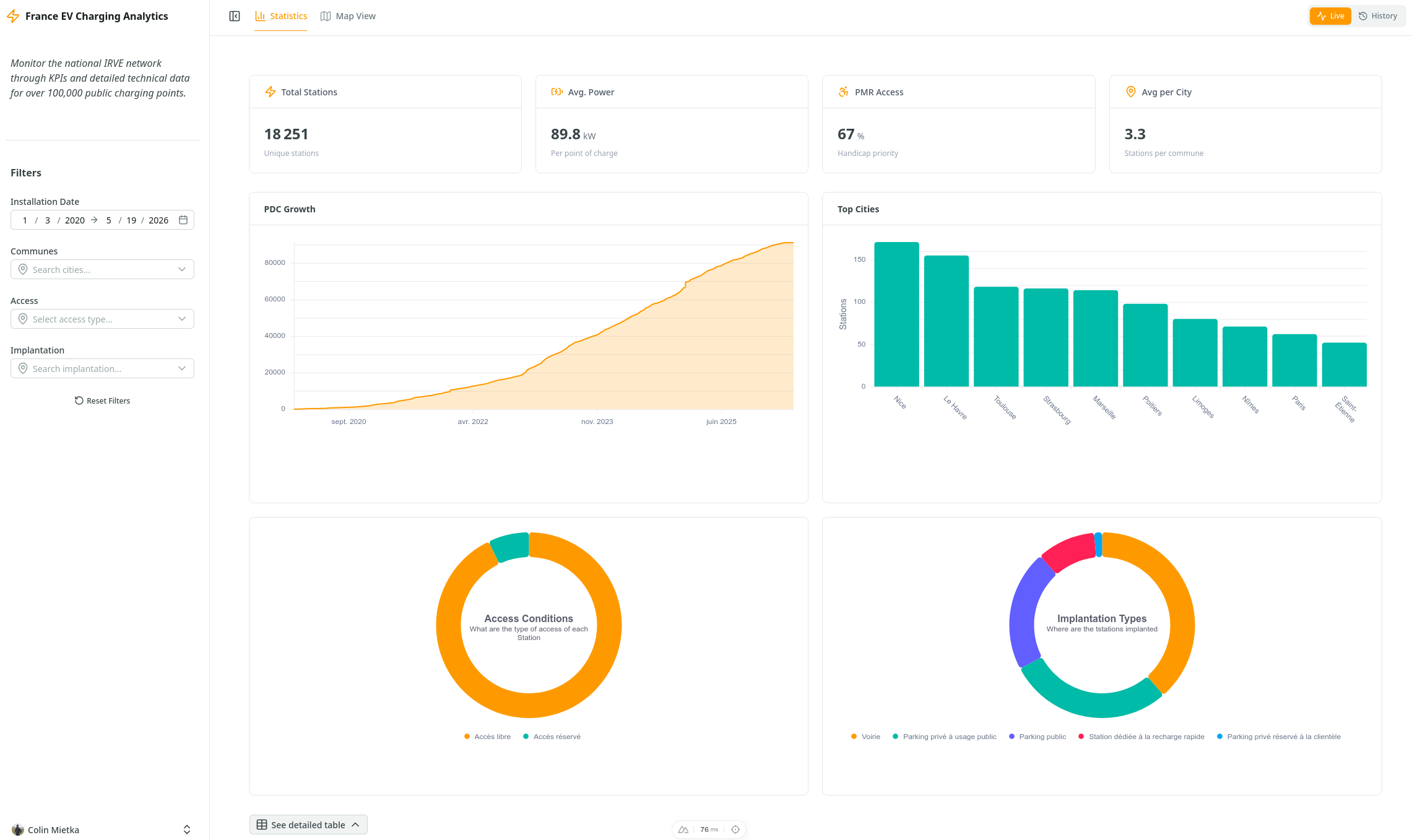
- Lazy Polars Integration: The backend uses LazyFrame processing, ensuring that data filtering, grouping, and aggregations are only executed at the last possible moment. This allows for efficient handling of relatively large datasets without high memory overhead.
- Rust-Powered Speed: By using Polars instead of Pandas, data operations are multi-threaded and significantly faster, providing near-instant feedback for dashboard queries.
- FastAPI with Pydantic Schemas: All backend routes are strictly protected by Pydantic models. This ensures that incoming filters from the frontend and outgoing data for charts are validated against specific schemas before transmission.
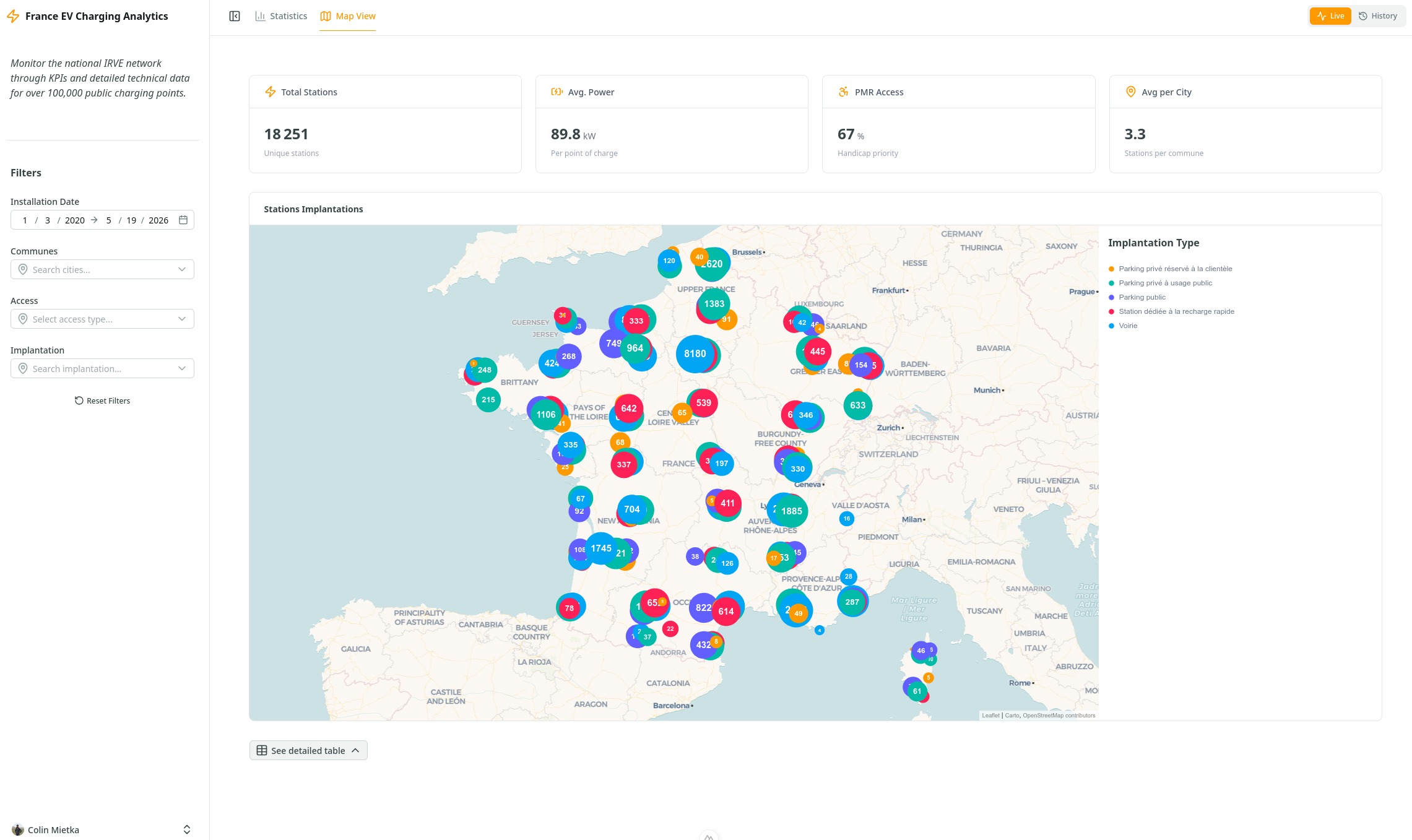
- Nitro Server Proxy: A Nuxt Nitro server-side bridge handles requests between the frontend and the FastAPI backend. This layer acts as a gatekeeper, validating backend responses against TypeScript interfaces to prevent runtime UI errors.
- Pinia Global Store: A centralized store manages the state of all active filters.
- Debounced Filtering: Filter updates are debounced. This prevents "request spam" by waiting 500ms after the user stops interacting before triggering a backend refresh.
- Dynamic Metadata Sync: On initialization, the dashboard automatically fetches global metadata to synchronize the UI components with the actual range of the underlying dataset.
- Nuxt UI v4 Standard: Built using the latest UDashboard component suite.
- Optimized Performance: Long lists (e.g., thousands of France cities) are handled via Virtual Scrolling to maintain UI performance.
- Reactive KPIs: Core metrics update instantly as filters change.
- Reactive charts: Chart react to filter as well but are also source of the filtering engine for improved interactivity.
- Data Table: Visualize current dataset state with a responsive table that updates dynamically as filters are applied.
A high-performance analytics dashboard designed to visualize data. The application leverages Polars for lightning-fast data processing and Nuxt 4 & Unovis for a reactive, component-driven user experience. The current data topic is charging station distribution and growth.
Conclusion
After these few weeks of immersion into the Nuxt.js ecosystem, I am proud of what's been accomplished, the codebase has grown significantly and the projects feels more professional than they were before. But it's not all done yet, and I fear they journey is just starting ! Hopefully, if you're still reading this post, you might find some inspiration to start your own projects with Nuxt.js. In the meantime, my list of issues/todos is still long...